1
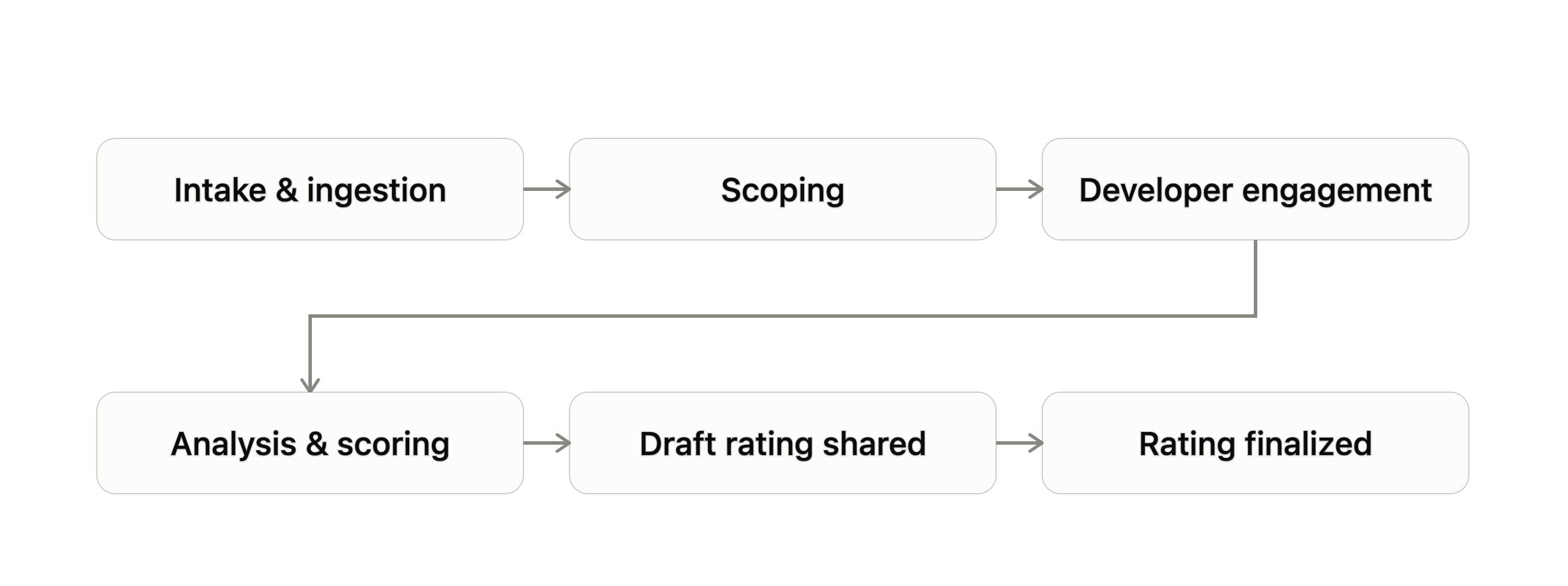
Developer engagement
Sylvera requests further documentation from the developer with a data request sheet, under a signed Engagement Agreement. This may include clarifying a variable used in a credit calculation, providing a shapefile of the project area, or commenting on external reports relevant to the project.
2
Analysis & scoring
Sylvera’s Core Pillars are assessed independently, based on the evidence gathered, then combined to form the letter grade (AAA–D). This grade reflects the project’s overall quality across every pillar.
3
Draft Rating shared
The developer reviews the draft during a 5-business-day feedback window. This gives them an opportunity to flag factual errors or provide additional context before the Rating is finalized.
4
Rating finalized
Sylvera incorporates feedback and publishes the Rating to the Sylvera platform
Governance principles
- Commercial conversations are always decoupled from Rating production. Commercial team members are not privy to scoring discussions
- Even when the developer is the paying customer, engagement with Sylvera’s Ratings team remains separate. Analysts are not included in client-facing calls; our Client Delivery team acts as the intermediary between the Analyst team and clients
- Purchasing a Rating can secure prioritization of the Rating’s timeline, but never influences its outcome
- Every Rating within a given project type follows the same deterministic framework, so no project or developer is assessed on different terms
Developer Engagement
Sylvera engages with project proponents as part of the Rating process for every project. To improve the quality and accuracy of our Ratings, and to ensure a fair process, we often seek clarification from proponents or request additional information. This could include asking a proponent to justify a variable used to calculate permitted credit issuance, requesting a shapefile (map) of an area of interest, or asking for comment on a press article about the project. Despite this engagement, Sylvera always maintains editorial control over its published materials.1
Data collection
Sylvera shares a project type-specific Data Request Sheet as the first step. The developer will then provide Sylvera with all relevant project information, on an agreed timeline
2
Review
Sylvera reviews the information and asks material questions while producing the Rating. Documentation commonly requested includes carbon accounting data, project and reference area boundaries, financial models, land tenure records, benefit-sharing details, and explanations for any registry status flags
3
Draft shared
Sylvera shares the draft Rating with the developer for feedback, opening a 5-day feedback window
4
Publication
Sylvera incorporates the feedback it receives and publishes the finalized Rating
Status labels
Pending developer engagement


Post Rating Care

On Watch
After we publish Ratings, if we become aware of circumstances that could lead to a material change to a project’s Rating, including its withdrawal, we place the project On Watch until the review is complete. This status signals to market participants that a project’s Rating is more likely than not to change, positively or negatively, as a result of new information. We remove the On Watch status once a review and the Rating is updated. If the review results in a change to the project’s Rating, we explain that change. If the Rating doesn’t change, we explain why. Potential triggers for On Watch status include:- A recent policy change, at the national or project level, that could significantly affect the project’s ability to issue credits.
- Recent extreme weather events or human activity that have caused a significant loss of carbon stock in or near the project area.
- Recent reports or information suggesting the project will stop operating as a voluntary carbon project (e.g. project withdrawal or early termination).
- Recent reports or allegations about the project that, once investigated and corroborated, suggest the Rating needs to be revised.
- Planned framework or machine learning model updates that may affect the Sylvera Rating, positively or negatively.